About Top Process Monitor
Displays the processes that are using the most CPU, memory, IO and other on your system.
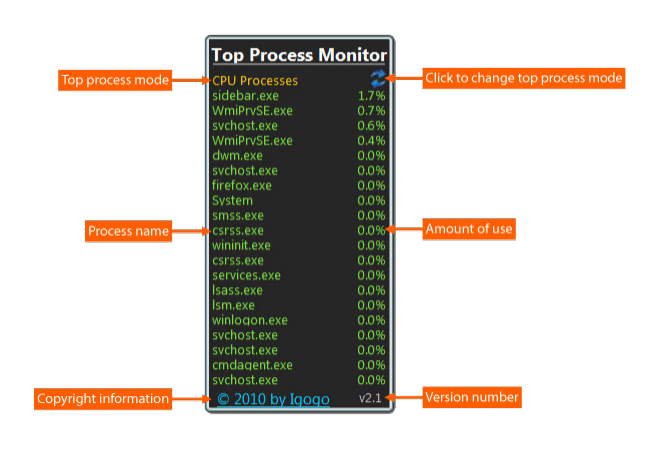
Top Process Monitor is a tiny gadget that allows you to view the processes which are using most of your CPU, memory and critical components of your system. It can be easily installed and configured, even by less experienced users. The interface of the app is based on a small frame that you can move to any position on the screen. So, you can check out the current CPU level, along with the applications and the total number of included threads. Top Process Monitor comes with several configurable settings. So, you can select the to processes mode between CPU, memory, PageFiles, Virtual Memory, I/O, read, write, total read and total write. But you can also adjust the size of the frame or make Top Process Monitor automatically do that, set the refresh rate and number of processes to show, as well as establish the double-click action (Task Manager, Resource Monitor, Performance Monitor, or none). On top of that, you can make Top Process Monitor cycle through all the aforementioned modes on click, display a warning if the resources usage is above a certain level, customize frame colors, switch to a different language for the UI, as well as restore all settings to their default values. The simple-to-use program does not put a strain on the computer, as it uses a low amount of CPU and system memory. It has a good response time and didn't freeze, crash or pop up errors during our testing. Thanks to its wide range of customization features, skilled users can definitely get a kick out of Top Process Monitor.
Previous Versions
Here you can find the changelog of Top Process Monitor since it was posted on our website on 2015-04-28 03:00:00.
The latest version is 7.9 and it was updated on 2026-09-29 10:38:28. See below the changes in each version.
Top Process Monitor version 7.8
Updated At: 2017-03-03
Disclaimer
External Download
We do not host Top Process Monitor on our servers. We did not scan it for viruses, adware, spyware or other type of malware. This app is hosted by the software publisher and passed their terms and conditions to be listed there. We recommend caution when installing it.
The external download link for Top Process Monitor is provided to you by apps112.com without any warranties, representations or guarantees of any kind, so access it at your own risk.
If you have questions regarding this particular app contact the publisher directly. For questions about the functionalities of apps112.com contact us.